
Prompt guide
Complete guide for Caricature Companion
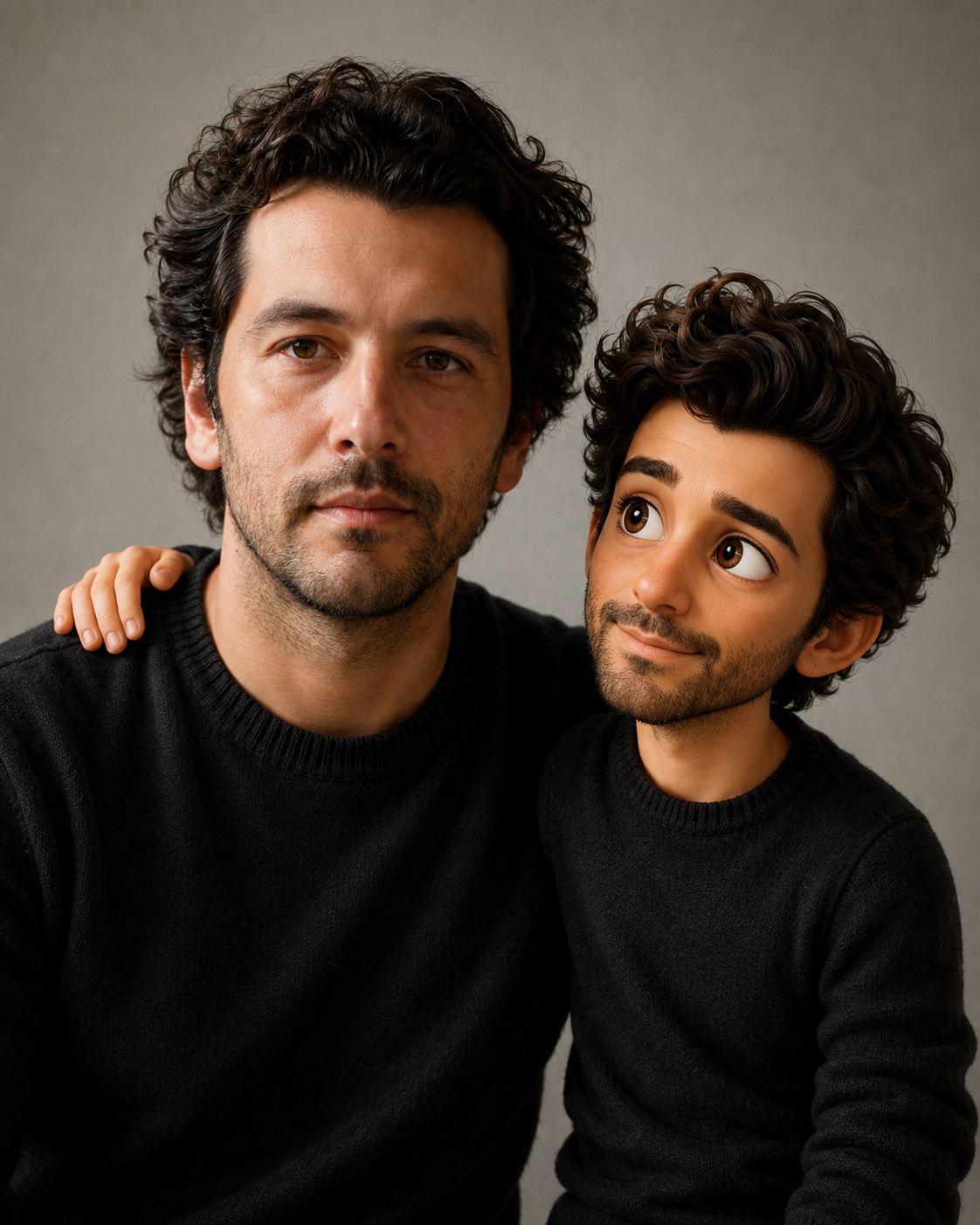
The Caricature Companion prompt creates a playful image where the original person remains realistic while a 3D caricature companion version of that same person appears beside them. This is different from simply turning someone into a cartoon. The real person should stay in the scene, with their original identity, lighting and environment preserved, while a smaller expressive companion character interacts with them naturally. The result should feel like a premium character edit, not a cheap sticker pasted onto a photo.
The prompt focuses on identity, scale and believable integration. It asks the AI to preserve hairstyle, outfit, accessories, attitude and overall vibe in the caricature while giving it large expressive eyes, a slightly oversized head and fashionable adult proportions. It also specifies that the companion should be approximately shoulder-to-ear level, avoiding the common mistake of making it look like a tiny mascot, baby, doll or toy. The real person and the caricature should interact physically or emotionally, making the scene feel intentional.
This template is excellent for funny profile edits, social media images, creator content, personal gifts and reaction-style visuals. It is also useful for people who want a humorous transformation without losing the original photograph. The aspect ratio selector lets users create square posts, vertical stories or wider compositions. The validation rules block identity loss, disconnected characters, extra people, low-quality compositing and cartoonizing the original person.
How to use this prompt
- 1
Upload a photo where the person is clearly visible and has enough space around the upper body for the companion to appear naturally.
- 2
Pick the aspect ratio based on the final platform. Vertical works for stories, square for posts and wider ratios for thumbnails or banners.
- 3
Generate with the full prompt so the original person remains realistic while only the added companion becomes a stylized 3D caricature.
Best use cases
Creating funny profile images where a mini character version of the person reacts beside them.
Making personalized gifts, birthday edits or playful social media content from real photos.
Producing creator thumbnails with a unique character companion while keeping the original person recognizable.
Tips for better results
Use photos with clean lighting and visible clothing so the caricature can mirror important identity details.
Avoid very tight crops because the companion needs believable space to stand, lean or interact.
If the companion looks too small or toy-like, regenerate while keeping the scale rules about shoulder-to-ear height.
Common mistakes to avoid
Using a photo with no available space around the person can cause awkward placement or cropping.
Letting the AI cartoonize the original person defeats the purpose of having a realistic person plus caricature companion.
Removing integration rules can produce a pasted-on sticker instead of a character that shares lighting and perspective.
Final recommendation
Use this prompt when you want a funny personalized edit that keeps the real person and adds a believable caricature companion. Clear photos with room for interaction produce the strongest results.